
It’s the time of year where all of those cookies and Biscoff Truffles have you thinking how you’ve got to get back to the gym in January. Naturally, that thought dominos to the next – it’s time to set New Year’s resolutions. “And this year, I’ll definitely follow through.”
This is where many end their planning – with a laundry list of intentions. “In 2026 I’ll lose weight, spend less money and read more books.” I think it’s safe to assume that stopping at this point is why 91% of Americans fail to achieve the resolutions they set.
Having fallen victim to the ambition trap myself, I began iterating on an annual planning framework in 2021. I read articles and books, listened to podcasts and watched YouTube videos. With every self-proclaimed productivity guru sharing their silver bullet system, it quickly became overwhelming and difficult to separate the fluff from what would actually help me grow.
I tried many methods and concepts. I designed my year around a theme. I Photoshopped a vision board. Last year I made a bingo card for my goals. I even bought a course promising to improve my life in 30 days. Some of these ideas worked for me – others didn’t.
I came to realize that writing down what I wanted to do wouldn’t cut it. I needed to implement a system of how I was going to do it. Additionally, I needed to stop biting off more than I could chew.
Disclaimers
A big discovery on this journey was coming to the understanding that no one system, method or concept works for everyone. Another inconvenient truth, at least for me, is my framework needs to be tweaked every year. As I grow and change, so does my system.
I mentioned this earlier, but be intentional about how much you take on at once. This is an iterative process – it’s better to start with a small “minimum viable product” and adjust or build out from there as needed.
Setting My Intention
Before I even began setting goals this year, I took time to reflect on the previous year. What happened in 2025? What were my accomplishments and highlights? More importantly, what lessons can I take away from the previous 365 days? What didn’t work and how can I change that this year?
Then I revisited my Personal Mission Statement. I picked this up from The 7 Habits of Highly Effective People by Stephen R. Covey. Specifically, Habit 2: Begin With the End in Mind. Covey says this habit is “based on the principle that all things are created twice. There is a mental (first) creation, and a physical (second) creation. The physical creation follows the mental, just as a building follows a blueprint.”
Similar to what is written for businesses, my Personal Mission Statement is a couple sentences that capture the essence of what I want my life to be. This, along with a Purpose Statement and a listing of my Values, help to set my intention – or North Star – for next year.
Auditing My Life
After getting into the right mindset, I participated in two audits I learned from the Personal Excellence blog: the Life Wheel and a modified version of the Vision Board. The Life Wheel exercise involves you evaluating and scoring each area of you life, such as Career, Finances, Health, etc. A Vision Board or similar effort helps you to visualize and imagine your ideal life. Once you know where you are, what’s not working, and where you’d like to be, your goals, projects, habits and reviews will help you progress towards your North Star.
I want to give a big shout-out to Celes at Personal Excellence. She has written many great articles across a variety of topics including self-improvement, goal achievement and productivity. Definitely check out her work.
My Personal Taxonomy
I strongly recommend the note-taking tool Obsidian for this process. It allowed me to effectively build a connected outline of my life, using my own version of the Life Wheel as my primary categories. You can think about this like a website’s sitemap – a tree structure with items bucketed in relevant categories. This outline helps ensure everything you want to track is documented, organized, and can even map across your task manager and your computer file system, so nothing gets lost.
- Life
- Planning
- Bucket List
- Environment
- House
- Vehicles
- Craft
- Game Development
- Writing
- Visual Arts
- Photography
- Growth
- Fun
- Travel
- Japan Study Abroad
- Travel
The above is a sample of my Taxonomy, from Areas to Categories to specific Projects. Taking this inventory not only helped me to inform my Life Wheel scores, but also what areas of my life I’d like to make progress in and which areas I need my goals to be set.
Goals
Now is when I got to the more traditional resolutions: setting my S.M.A.R.T. goals for the year. These are Specific, Measurable, Achievable, Relevant and Time-Bound objectives. I like to align one goal to each area, within reason. If I have seven Life Areas, that’s likely too many goals, so I prioritize the areas that scored lower in the Life Wheel exercise.
To help break up goals or sub-goals, I like to set them by quarter. For example, I want to work on learning more musical instruments in 2026. To make this more digestible, I have decided to learn one song on the drums in Q1, and one song on the banjo in Q2. These tick all five boxes of a S.M.A.R.T. goal.
A note on goal-setting. Be intentional and limit yourself. For me, this time of “turning over a new leaf ” can be one where my ambition takes over and leads to setting too many goals, stretching myself thin. It’s difficult to use this constraint, as choosing to a handful of the most important goals means de-prioritizing other things you may want to pursue. Fun fact, word “decide” has a Latin root that means “to cut off.”
It’s okay to be ambitious, so when I found myself identifying many pursuits, I penciled them in for following years. Setting goals at 1, 3 and 5 years out can help with longer-term planning and ensure all of your pursuits are included in your plan – eventually.
For continued break-down of goals into bite-sized chunks, I recommend David Allen’s Getting Things Done. This productivity method helps keep you on track and ensures nothing gets lost along the way. Personally, I use Todoist to track all smaller tasks in a project and which item comes next.
Habits
I have been trying to get around to reading Atomic Habits, and one of my goals is to finally dive into it this year. My hope is this book will help reduce friction in my daily schedule: establishing patterns (which the brain likes), curating an environment that sets me up for success, habit-stacking, etc. are of much interest.
Habits are the work you actually have to do. These are the execution of the goals. If I’m going to learn “Wrench and Numbers” from the Fargo TV series, I will have to carve out dedicated time each week where I practice the drums. This incremental progress, or what Jim Collins calls “The Flywheel Effect” in his book Good to Great, are the single steps we on our journey of a thousand miles.
Review Rituals
There are many keys to this framework, and reviews are unexpectedly important. These are the daily journal entries, weekly GTD reviews and monthly check-ins that help you determine what’s working, what needs to change, and what’s next. You may not be one for daily journaling, but the weekly review is a must for making tweaks to your routine, planning for the upcoming week, and identifying your priorities.
I like to carve out at least 30 minutes per week for this. Brew some coffee (or go to your favorite coffee shop), eliminate all distractions, and go through the review items you have set for yourself. Here are a few I check each week or month:
- Are there any upcoming birthdays?
- What is on the calendar this week/month?
- Whats the next task in each project I have?
- How am I progressing on my goals?
- Are there any events this month I’d like to attend?
Skipping this exercise and my habits are where I’ve fallen short in the past. It helps me to keep myself accountable and remind myself of the goals I have set.
Closing Thoughts
This represents a shift in my annual planning process. It’s informed by successes and shortcomings over the past four years. Next year, it will likely need some tweaking as I achieve some goals and miss the mark on others.
This is how I think about this framework:
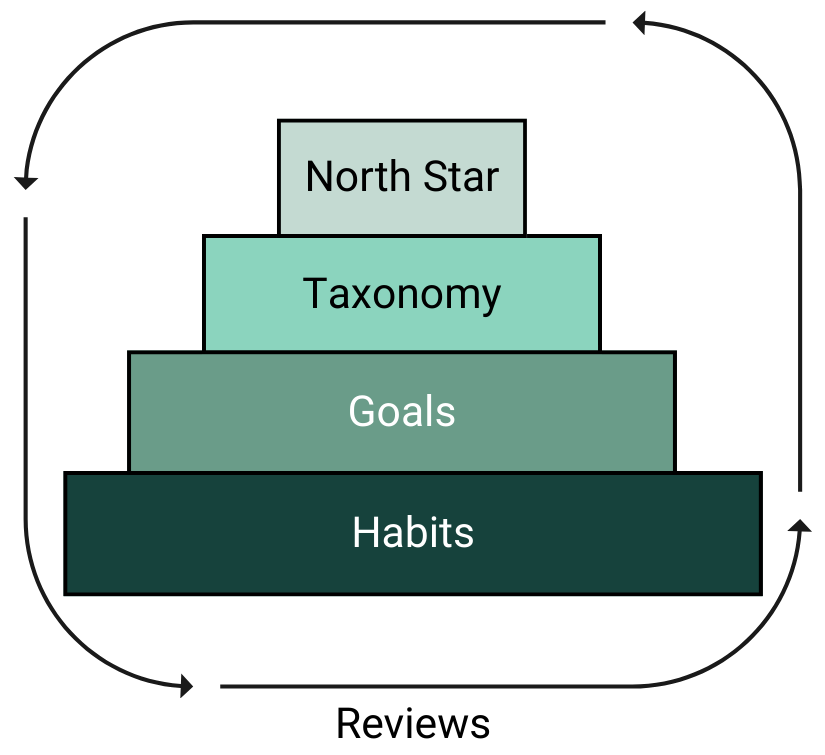
Each step in the planning process has connections to the other, with work being the foundation of the plan. Reviews recur around each step, as I want to ensure I have check-ins across all areas on a consistent basis – always adjusting my heading towards the North Star.
I hope the time I have spent reviewing of the systems’ of others, designing my own from pieces of their frameworks, and sharing the outcome with you will help you on your growth journey. If your method is different, I would love to hear what works for you!
Acknowledgements
I want to thank Ryan Kerr for reviewing this article.
Happy New Year.